Beta·Free access for early testers — no credit card required.Join free →

AI MIX
ENGINEER

Load it on your key tracks. One click. The AI balances your whole session in context.

Download Plugin →
Free during beta·No credit card·VST3 & AU
Format:
VST3·AU
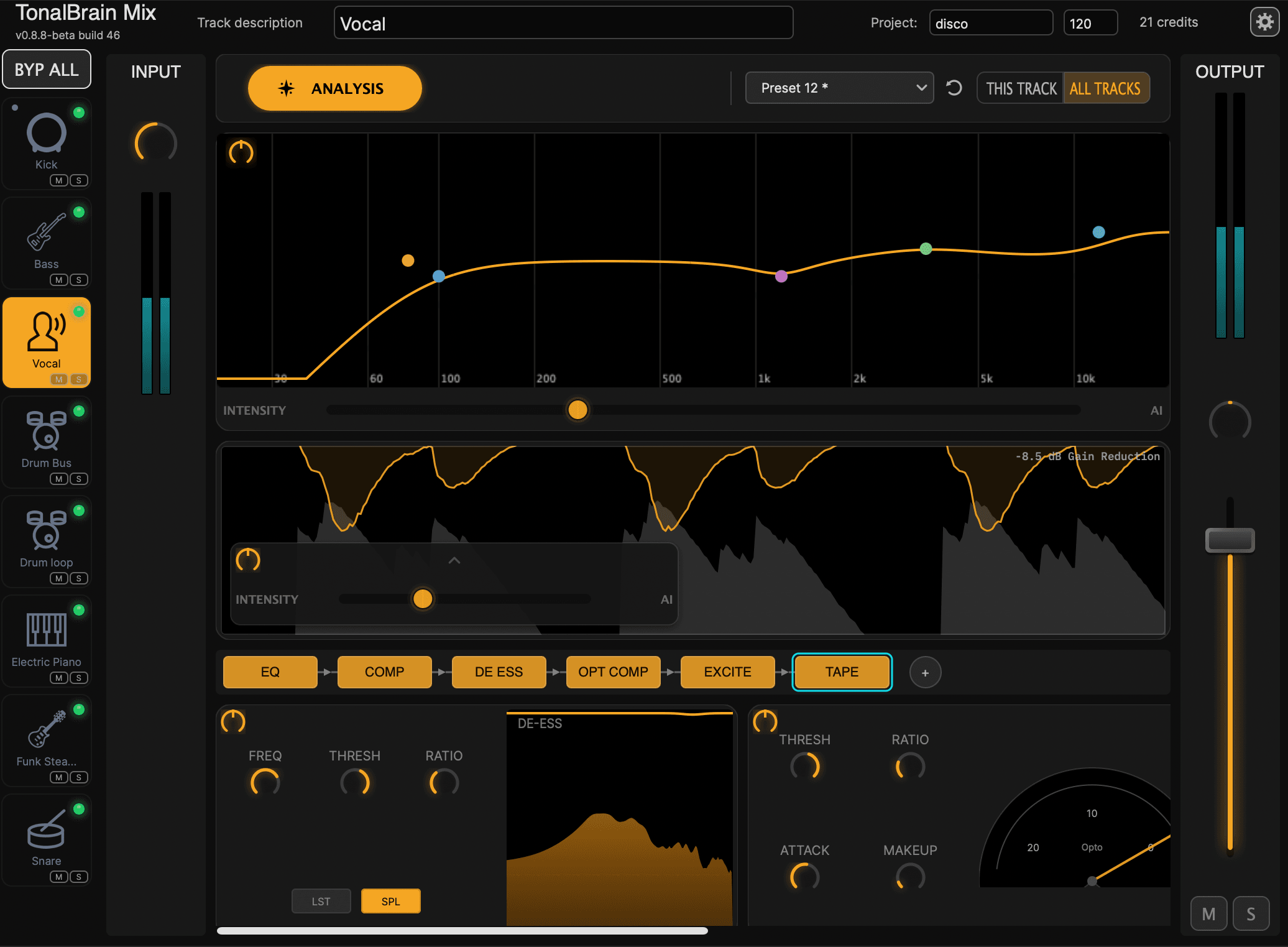
TonalBrain Mix plugin interface
How it works

NOT A TRACK PLUGIN.
A SESSION PLUGIN.

Unlike every other plugin in your chain, TonalBrain Mix works across your whole session — not on a single track. Here's how to set it up.

playlist_add
Step 1

Load on your key tracks

Add TonalBrain Mix to up to 16 key tracks (increasing soon) — kick, snare, hi-hat, bass, lead vocal, main instruments. For stacks of similar elements like backing vocals or percussion layers, bus them together first.

tab
Step 2

All tracks in one window

Every instance you add appears as a tab. Keep one window open, close the rest — your whole session is visible and controllable from a single plugin.

auto_awesome
Step 3

Analyze your whole song — or section by section

The AI sees how all your tracks interact — frequency masking, dynamic collisions, balance — and applies the right settings to each one. Capture separate snapshots for your verse and chorus so each section gets its own independent mix decisions.

Why it matters: A kick drum that sounds great in isolation can still clash with the bass when the full mix plays. Analyzing one track at a time misses that entirely. TonalBrain sees the whole session at once — that context is what makes professional balance possible.

ONE CLICK. WHOLE SONG.

layers
01

Multi-Track Context

Analyzes every track simultaneously. Identifies frequency masking and dynamic collisions that solo plugins miss.

tab_unselected
02

Section-Aware Analysis

Show the AI your verse and your chorus before it decides. It considers the full picture of your song and finds settings that hold up across the whole arrangement.

compare_arrows
03

One-Click A/B Testing

Every analysis run is saved as a preset. Switch between presets across all tracks simultaneously and compare whole-mix results in seconds.

Section Analysis

YOUR VERSE AND CHORUS
ARE NOT THE SAME SONG.

Most plugins analyze whatever is playing the moment you click. If your session is parked at the chorus, the AI only knows about your full band — and those settings often feel heavy during a sparse verse.

With section snapshots, you show TonalBrain multiple moments of your song before it decides anything. It considers the instruments, density, and dynamics of each section you captured — then finds EQ, compression, and stereo settings that hold up across your whole arrangement. One coherent result, informed by the full picture.

Up to 2 section snapshots per project now, with more sections coming in a future update.

1
Snapshot one

Play your verse. Capture it.

The AI sees exactly which instruments are active and how they interact in this part of the song.

2
Snapshot two

Play your chorus. Capture it.

Now the AI knows about the full band too — the density, the collisions, the range of your whole arrangement.

auto_awesomeResult

One analysis. The full picture.

Settings that work across your whole song — not just the section your playhead happened to land on.

Preset System

A/B YOUR WHOLE MIX
IN ONE CLICK.

Every time you run an analysis, the result is saved as a preset. Switch presets globally and every track in your session updates at the same time — no opening each plugin individually, no toggling bypass channel by channel.

  • checkEach analysis run saved as a preset
  • checkSwitch presets globally — every track updates in sync, instantly
  • checkRun multiple analyses, then compare them all without touching a single track

How it works

1

Run an analysis. The result is saved as a preset.

2

Tweak inputs or sections and run again. Another preset saved.

3

Switch between presets from any instance. All tracks update at once.

The fastest whole-mix A/B workflow in any DAW

THE AI STARTS IT.
YOU FINISH IT.

No black box. Every AI decision is transparent and adjustable. Dial in EQ frequency, Q, and gain. Tweak compressor parameters. Override any setting while the rest of the mix stays intelligently balanced.

  • checkAdjust EQ bands per track: frequency, Q, and gain
  • checkFull compressor parameter control for advanced shaping
  • checkOverride any module while the mix stays in context

PRICING

Pay only for what you use. Each analysis run costs 1 credit — no subscriptions, no monthly fees. New accounts include 5 free credits to get started.

Currently in beta — free access

Sign up to download the plugin and start mixing right now. No credit card needed — your first 5 credits are on us.

Join free →

Starter

For producers getting started.

$9

50 credits

$0.18/credit

  • check1 credit per analysis run
  • checkUnlimited tracks per run
  • checkCredits never expire
  • checkMac & Windows

Creator

Best Value

Best value for regular sessions.

$25

200 credits

$0.13/credit

  • check1 credit per analysis run
  • checkUnlimited tracks per run
  • checkCredits never expire
  • checkMac & Windows

Studio

For high-volume professional use.

$59

600 credits

$0.10/credit

  • check1 credit per analysis run
  • checkUnlimited tracks per run
  • checkCredits never expire
  • checkMac & Windows
info

One-time purchase — no subscription required. Credits are shared across all your devices and never expire. New accounts receive 5 free credits automatically.

FAQ

Multiple tracks — that is the whole point. Load TonalBrain on each of your key tracks (kick, snare, hi-hat, bass, lead vocal, main instruments), up to 16 tracks for optimal accuracy (increasing soon). Each instance you add appears as a tab in the plugin, so you only need to keep one window open. When you click Analyze, the AI sees how all your tracks interact with each other and applies the right settings to each one.
Both, and you can combine them freely. Load TonalBrain on your individual key tracks (kick, snare, hi-hat, bass, lead vocal) and also on bus or group tracks at the same time. TonalBrain automatically detects which tracks are routed through a bus and will not double-process them. The practical rule: if you have multiple layers of the same instrument (three kick samples, stacked synths, backing vocal layers), bus those layers together and put TonalBrain on the bus instead of each individual layer. For distinct instruments, load a separate instance on each.
Yes. With section snapshots, you show TonalBrain multiple moments of your song before it makes any decisions. Play your verse and capture a snapshot, then play your chorus and capture another. The AI considers the instruments, density, and dynamics of each section you captured — then finds EQ, compression, and stereo settings that hold up across your whole arrangement. One coherent result, informed by the full picture. You can save up to 2 section snapshots per project right now, with more sections coming in a future update.
TonalBrain handles the corrective technical side of mixing: EQ to fix frequency masking between instruments, compression thresholds, de-essing, and stereo placement. Creative effects like reverb, delay, saturation, and spatial design are entirely yours to shape. Mixing is both art and technique. We take care of the technical decisions that require years of trained ears and deep knowledge of acoustics — so you can spend your time on what only you can do: the artistic choices that give your music its character.
TonalBrain is an AI-powered audio plugin that analyzes your entire multitrack session to provide intelligent mixing decisions. Unlike traditional plugins that process one track at a time, TonalBrain listens to all tracks simultaneously to identify frequency masking, dynamic collisions, and balance issues — then applies professional-grade EQ, compression, de-essing, and stereo imaging across your entire mix. It can also analyze different song sections so the result works across your whole arrangement, not just one moment of it.
TonalBrain is available in VST3 and AU formats, compatible with all major DAWs including Ableton Live, Logic Pro, FL Studio, Cubase, Reaper, Studio One, and more.
TonalBrain runs on macOS 10.15 (Catalina) and later, including Apple Silicon M1/M2/M3 natively, and on Windows 10 and Windows 11 (64-bit).
TonalBrain is designed to work with multitrack sessions for best results — it needs individual tracks to understand the full context. That said, you can use it on stem groups (like a drum bus) effectively. For stereo mastering of full mixes, we recommend a dedicated mastering tool.
Every new account gets 5 free credits on sign-up — no credit card required. That gives you 5 full analysis runs to experience TonalBrain before buying more credits.
TonalBrain uses a simple pay-as-you-go credit system — no subscriptions, no monthly fees. Each analysis run costs 1 credit. You buy credits once and they never expire. Every new account receives 5 free credits to get started, so you can try the full experience before purchasing.
There are three packages: Starter (50 credits for $9), Creator (200 credits for $25 — best value), and Studio (600 credits for $59). Credits never expire and there are no recurring charges. You can top up whenever you need more.
Your TonalBrain account works across all your personal devices — there is no per-device activation limit. Just log in with your account on any machine you own and your credits are available everywhere.
Your raw audio never leaves your machine. TonalBrain analyzes the frequency and dynamic characteristics of your tracks locally, then sends that analysis data to our servers to generate your mix settings. No audio files are uploaded — only the spectral data needed to make mixing decisions. We do not store or share your audio content or analysis data beyond processing your request.

Still have questions?

Get in toucharrow_forward

READY TO TRANSFORM YOUR MIXES?

Join producers using TonalBrain to get professional-sounding mixes in seconds. Start with 5 free credits — no card required.